Thursday, June 18, 2020

Android 11 in phones!

  The beta for the next version of Android, which is Android 11, is available for Pixel phones .  I wanna get into what the new features are. Now, overall, my take is that Android is a mature operating system, which means that the fundamentals are really not gonna change that much. There are a few new important features but the context here is that android already does a lot. And so a lot of the features aren't necessarily about doing new things but helping you make sense of all of the things that Android already does. One of the biggest jobs that a mature operating system has is managing complexity. So here's a question, how well does Android 11 manage all of the things that Android does? So to start, every version of Android messes with notifications. And I'm actually not complaining about this because notifications are a huge source of complexity. And I much prefer the year-over-year changes that Google tries to make with Android to improve it than the way that Apple does things with the iPhone, which is to almost never change anything about notifications. See, notifications went from a way for you to see your text messages into this nightmare, catch-all of everything. News, and media controls, and thirsty apps trying to get you to re-engage with their content, and alerts that apps are using your background location. And it's just a lot. So in Android 11, Google is separating out your notifications into three really clear and distinct sections with big, obvious labels.
                              
                    Android 11 के बेस्ट 11 फीचर्स, जो बदल देंगे ...

There are Conversations, Alerting notifications, and Silent notifications. And the new section here is Conversations, which separates out the notifications from your chat apps into their own section at the top, and that lets you do a bunch of things with those notifications. The first thing is you can bubble those notifications, which turns them into these like bubble chat heads that sit on the top of other apps. You might have seen it in apps like Facebook Messenger, where there's this head floating around, you can put it wherever you want, you tap on it, and it opens up the conversation. That's now going to become available to any chat app on Android. And by default, that's just gonna show like the whole chat up inside little window, but developers can customize it for it if they want. The other thing that the conversations lets you do is you can long-press on them, and you can mark a person's conversation inside a chat app as a priority. And what that means is they're gonna be able to break through your do not disturb settings. And also when you look at your little notification tray at the top of your screen, you're gonna see their face instead of just the icon for the app. There are a few other new things with notifications, so you can more easily control where silent notifications show up. You can keep them from showing up in your status bar or on your lock screen. You can easily switch an app from alerting notification to silent notification by long pressing on it, bringing up some options. If you wanna get an app into a Conversations though, you gotta wait for the developer to update it to support that. Google also took what used to be a really weird hacky thing and they made it official.
                               
                               Top 5 Android 11 features that are worth your attention - Gizchina.com

You can go into your Settings and find your Notification history. So in case, you accidentally dismiss the notification, you can go to Settings and find it again. You also get a few more controls over how do not disturb works that lets you customize which apps are able to break through do not disturb, in addition to those priority conversations. So there is one other thing to talk about with notifications. You used to have media playback control in your notification shade, and Google's now moving that up into the quick settings. So it's sort of part of the notification shade, but sort of not, anyway, it's up there at the top now, and when you expand it down, there's gonna be a little button that you can press, and when you press it, it will let you choose where your audio goes, Bluetooth headphones, or speaker or wherever. So that's notifications. The next interaction zone that Google has beefed up for Android 11 is the power menu. It's the thing that you get when you long-press the power sleep-wake button thing. It has your usual power options like before, Emergency, Power off, Restart. There is lock down but unfortunately, it's hidden under a three-dot menu. Underneath that is your google Wallet passes. So your bank cards and your boarding pass if you ever get to go on a plane again, that's all stuff that we've seen before. What's new is that Google is putting smart home control buttons underneath that here. So it's sort of like what the iPhone does with home controls and control center. But on Android, it's in this power menu.

                          Android 11 aka Android R: What to expect from Google's next update

You can customize what buttons show , you can just tap on stuff to turn lights on and off, you can drag your finger to change brightness. You can also just long-press to go in and see more options and so on. This section is powered by the Google Home app. And that's good because it's one less thing that you have to set up. But it does mean that I think that different companies are gonna do different things with this power menu. So if you buy a Samsung phone, I would expect to see Samsung Pay and Samsung Smart Home controls in the section . So that's notifications and power. There are a couple of other zones to talk about.

There's the home screen, and one of the things you can do here is to replace your dot with suggested apps from Android, you know, contextual guesses of what you're gonna want to open next. And I've had it on and I don't really love it. These guesses at what app I'm gonna want to open usually aren't really that accurate. There's also the multitasking screen or you might call it the recent screen, and there are three new buttons on the bottom here. So if you tap screenshot, it pulls a screenshot of the app that's front most in multitasking. You can tap Select, and it will show you what text is select able to directly copy in your clipboard. Or you can tap Share, and it'll grab a screenshot of that front most app and bring up the Share sheet automatically. Speaking of screenshots, when you take one, it no longer goes into notifications, it creates this little interface down in the lower left-hand corner where you can tap Share or Edit. It's just like the way that the iPhone does it. So those are the major zones, notifications, power menu, home screen, and the new recent screen, and all of them are designed to help you make sense of all the features that android is now throwing at you. And I've got a whole theory about how it relates to iOS and the iPad and desktops, and it's all too much for this video, we have a lot more features of Android 11 to go through, so let's keep going. So location permissions are getting stricter in Android 11. From now on, apps can only ask for three different kinds. One time, while the app is open, or just straight up deny.

That one-time thing is new and it's something that the iPhone already has. Now, if an app really, really wants constant background permission, it needs to send you deep into Android settings where you turn on permanent access there. Also, if you hit deny a couple of times when the app asks you for location permission, Android will just tell the app to stop asking you and it won't be able to do it again. All right, let's see what else. Well, we've seen a bunch of stuff in the betas that are hopefully gonna stick around, but there's no guarantee. So I'm talking about screen recording. It's here in the beta. It was in the beta last year and they yanked it, but I hope it sticks around this year. We've also seen evidence of native scrolling screenshots which are gonna let you grab the entire web page. You should be able to pin apps to the Share sheet so that you don't have to depend on Google's predictions, you can just pin the thing you actually wanna share to. Airplane mode won't disable Bluetooth if you don't want it to. There's still a picture in the picture, but now you can resize the video. Dark mode has better scheduling options. There are more icon styles for Pixels theming. Google has this thing called Project Mainline that lets them update system-level components without updating the entire operating system. And there are 12 more modules that are getting added to that. G board is getting some updates for I think all Android phones, they've got more emoji kitchen fun little options, and it's getting auto fill. There's just a lot of little things.  So that everything in Android 11. Or at least it's all the stuff can think to talk about. And if you just look at the bullet list of all of those features, you'll see that it's a lot of filling out the corners and adding new little bits here and there.

But like I said, I think that Android is a mature operating system, so that makes sense. Beyond those new features though, what Android 11 is really about is making the stuff that you actually want to do a little bit easier to find. So say you wanna text with somebody that's important to you, their face might be right there in your status bar if they texted you, or their face might be in a bubble that's floating over the apps you're using right now, so you can get to it right away. Smart light controls finally aren't buried inside the Google Home app. They're right there in the power menu. And that power menu zone, it sort of makes sense to me. Google says it's like your keys and your wallet. It's the stuff that you put in your pocket to interact with the physical world. And I guess that's why that stuff isn't in quick settings. I mean, I could go on, but the point is that that little decision of what goes where and why that's the subtle stuff that ultimately makes a phone feel either intuitive or confusing. And there still is some confusing stuff here.

I think settings in Android is getting a little bit out of control. But I can see where Google's trying to go. Like I said at the top, if you have a Pixel, you can install the beta on your phone right now. It's also coming to a few other Android phones this summer, so keep an eye out for news about that. But I wouldn't put it on your main phone because it's a beta, and it's still a little bit rough around the edges. But you want me to answer the question, right? Did Google get to where it's trying to go? Does Android 11 make sense, is it intuitive? Well, I'm gonna wait until the final release of this software in the fall, because right now, it's still a beta, and they're Google, and they could totally move stuff around. But I do know that when I review it, I'm gonna be reviewing it on a Pixel because the Pixel's gonna get Android 11 first, and every other Android phone is gonna get it who knows when. Google's made some progress in the Android ecosystem of making those updates happen, but it's still not where it needs to be. So while I'm reserving judgment on whether or not Android 11 makes sense, I definitely think that knowing whether or not your phone is gonna get it is still way too confusing.  Hey, thanks so much for reading this blog. Let me know what you think about Android 11 down in the comments. Do you think it makes sense?

Wednesday, June 17, 2020

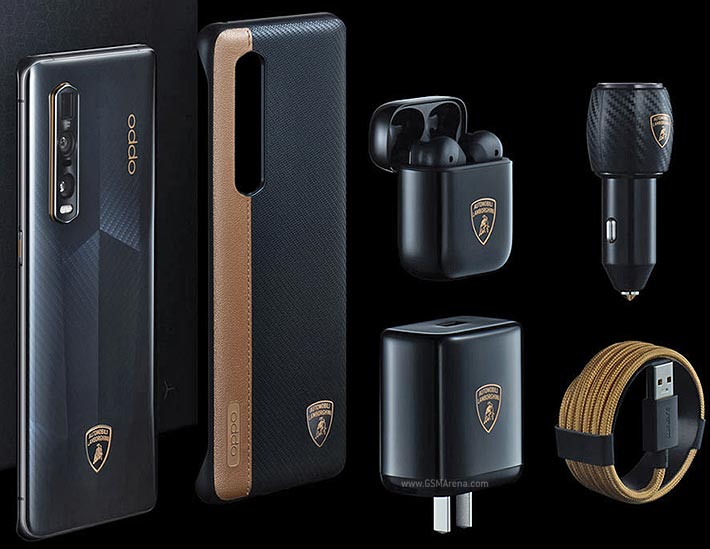
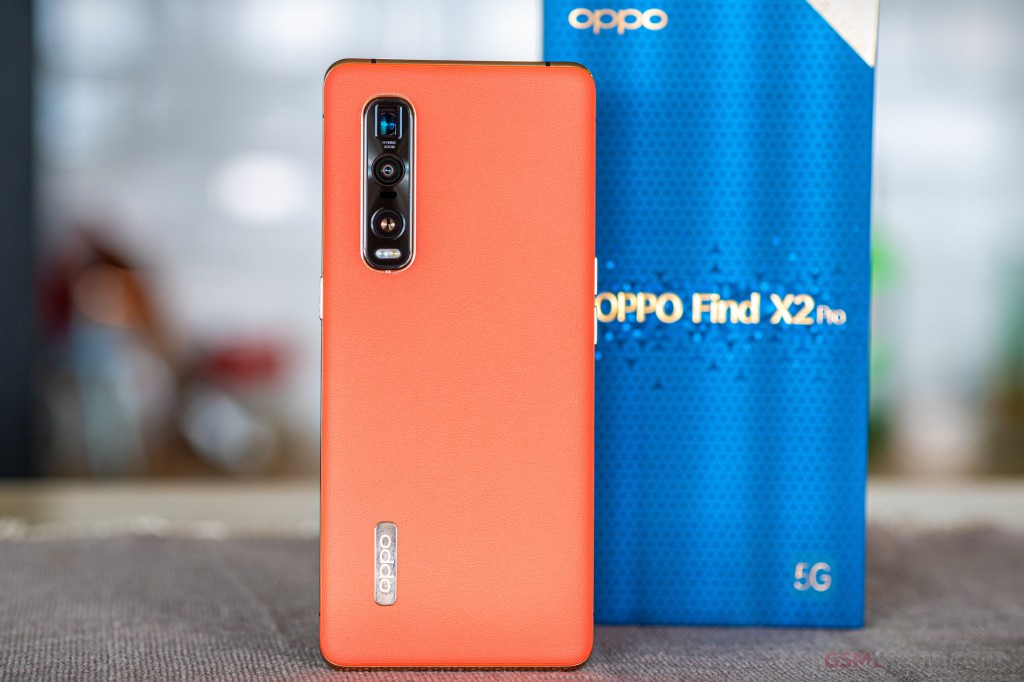
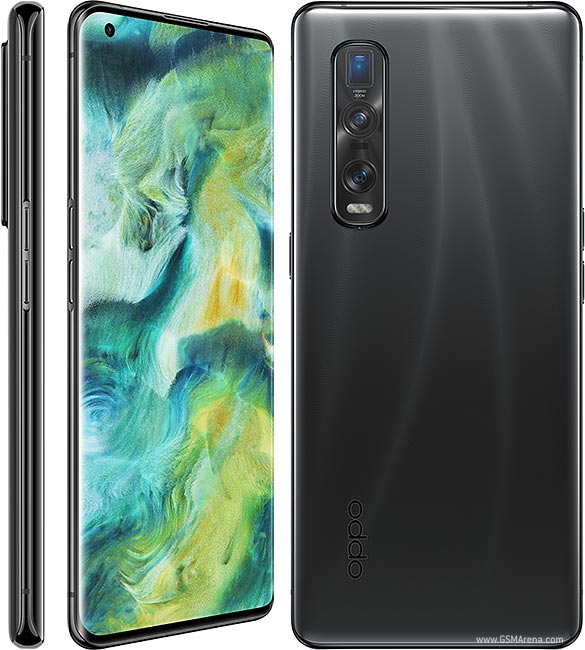
OPPO Find X2 Pro

What's up, guys? Om is here And in this blog, we're going to be taking a deeper dive into the OPPO Find X2 Pro. So I've been using this for around about a month now and there's a lot to talk about. I actually wanted to do this blog outside, do a bit of a day in the life, but unfortunately, we do have to stay home. So I hope you're also staying home and safe. So initially let's start off by talking about my absolute favorite feature on the Find X2 Pro, and that's this beautiful display.
                        
    Oppo Find X2 Pro
Let me just say that this has one of the best displays on any smartphone right now. It's around 6.7 inches, it's AMOLED, it's curved, it's got a small punch out so that gives it a very high screen-to-body ratio and, most importantly, its got a 120-hertz refresh rate, with a Quad HD+ resolution. This means details are super sharp and the animations are very, very smooth.  there are other displays out there that do have a 120-hertz refresh rate, but they can only have that refresh rate at a lower resolution. With the Find X2 Pro you are getting the best of the best. In addition to that you do have 10-bit color, so that's over a billion colors, and you've got a peak brightness of around 1,200 nits when viewing HDR content, which also makes this one of the brightest displays. Now, you may be thinking it's all well and good having such a great display but what if you don't have the content to match it? Well, this is where the ultra Vision Engine comes in. It's actually a physical chip that enhances regular content to make the most of this display. So we first have Motion Clear, which is motion compensation technology, and that will take regular30-frames-a-second video and make it so that it appears to be at a higher frame rate, 60 frames a second, or even up to 120 frames per second. And we also have HDR Video Enhancement, and that's going to give your videos an HDR makeover in real-time. And this is enabled across your favorite streaming apps, such as Netflix and YouTube, so it's not just limited to content that's on the device. And you're going to be able to get that enhanced experience across all of these different platforms. And you also have stereo speakers with Dolby Atmos. So I think it's safe to say that the media consumption experience on the Find X2 Pro is going to be second to none. Now, consuming all of that content is, of course, going to have an impact on battery life, but there are a few features here to make the most of it. The first is Auto Select for both resolutions as well as the refresh rate. refresh rate depending on the content you're viewing to save on battery life. But most importantly you have SuperVOOC 2.0 Flash Charge.

Oppo Find X2 Pro

This is 65-watt fast charging and it is the fastest charging I have ever tested on any smartphone. Generally, most smartphones right now in the market have around 18 watts charging out of the box. You get 65-watt charging, which is more than triple that on the Find X2 Pro. And this means you're going to be able to go from zero to 100% in just around 38 minutes. So even if you do spend a lot of time-consuming lots of content on here and get through the battery, you're going to be able to top it up very, very quickly. It can actually go from zero to around 40% in just 10 minutes. Now, it's starting to look pretty good outside so let's pop into the garden and talk about the cameras.
                       Oppo Find X2 Pro
Now, looking at the cameras, we do have a triple rear-facing camera setup. There's a primary camera, there's an ultrawide camera and there's also a telephoto periscope camera. The primary camera is a 48-megapixel camera and it's got the Sony IMX689 sensor. It's a large sensor and that means you're going to be able to get in a lot more light, a lot more detail, and it's also got All PixelOmni-Directional PDAF. And that means every pixel is a focus point. It's going to give you super-fast focus, even in low light situations. There's optical image stabilization, as well as 12-bit True Capture. So you're going to get some great colors, and I really do like what OPPO has done with the cameras this time in terms of color tuning, it is very, very natural. You've then got the ultrawide camera, which is also 48 megapixels. It's got a 120-degree field of view, so you're going to be able to get in a lot more into your shots. This is using Sony's IMX586 sensor and it's also got an ultra-macro mode which is going to allow you to get in super close and get lots of nice detail. And, finally, we've got the 13-megapixel periscope telephoto camera, which is going to give you around 10 times hybrid zoom and it's really quite impressive how close you can get into your subjects with this camera. And we've also got Ultra Night 3.0, this is going to really enhance your low-light photography, as well as a 32-megapixel front-facing camera for your selfies. there's also three mic recording, so it'll really help get rid of unwanted noise and wind.

Now, it's starting to get a little bit nippy out here so let's go back inside and check out some of the performance features. So what's powering the OPPO Find X2 Pro? Well, you'll be pleased to know it is the latest and greatest, the Qualcomm Snapdragon 865 chipset, along with the X55 modem to enable 5G. So connectivity speeds right up there. But in addition to that, you do have 12 gigabytes of LPDDR5 RAM with 512gigabytes of UFS 3.0 storage. And honestly speaking, in using this for around about a month I've had no stutters, performance has been absolutely on point, and especially when gaming. Because you've got 240hertz of touch sampling that means responsiveness when you're in a game is pretty much instant, and all of my gamers out there know how important that is. For software, we do have ColorOS7.1 built upon Android 10. And ColorOS has come a long way. It's a lot cleaner, its got lots of useful features and my favorite is the fact that you can lock your most-used apps into the RAM because there's plenty here to play with. And that means they're going to open almost instantly without having any load times. For the build and design, you can see that we've got a very premium build. This version here does have a ceramic back, and it's got this texture which gives it a little bit more grip and it also does look really cool. But there's also a vegan leather option which I currently don't have here. So if you do want to go for something that really stands out and is really different there is that option there. We've got IP68 water and dust resistance as well, so if you do get a bit of a splash on this that's not going to be a problem at all. So that's the OPPO Find X2 Pro. I've definitely enjoyed using it over the past month or so. And I think it's safe to say that this is one of the best smartphones that you can buy right now. What do you guys think of the Find X2 Pro? Definitely let me know in the comments below. If you're interested in finding out more or picking one of these up then I'll leave some links in the description below. I hope you enjoyed this blog and found it useful. If you did, then do hit that thumbs up a mark for me. And if you want to see lots more content like this here on this blog, then be sure to follow and I'll see you next time.

Xiaomi Mi 10

 Hey, guys, it’s Om, and today we are going to tell our first look at the Mi 10. It was priced at Rs.25,000 and at the time people in India were not ready for a flagship Xiaomi smartphone, so it didn’t do very well in India. So much so, that Xiaomi has refrained from launching any of their flagship smartphones in India, that is until this Mi 10. Even now, I am not too sure if people are ready for an Rs.50,000 Xiaomi smartphone, especially with the OnePlus 8 and 8 Pro around. But then, I also wanted to see what the Mi10 offers and if people willing to spend Rs.50,000 on a smartphone should keep this one in their consideration while making their choice.
                            
                              
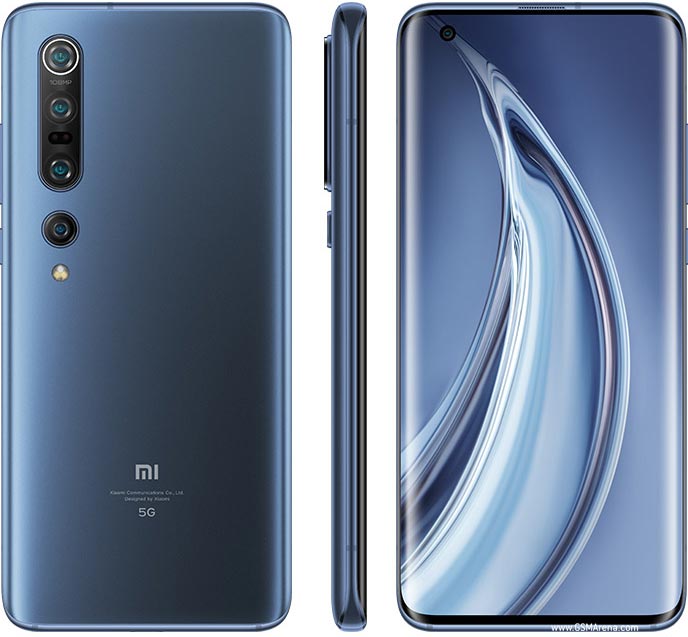
Xiaomi Mi 10 Pro 5G

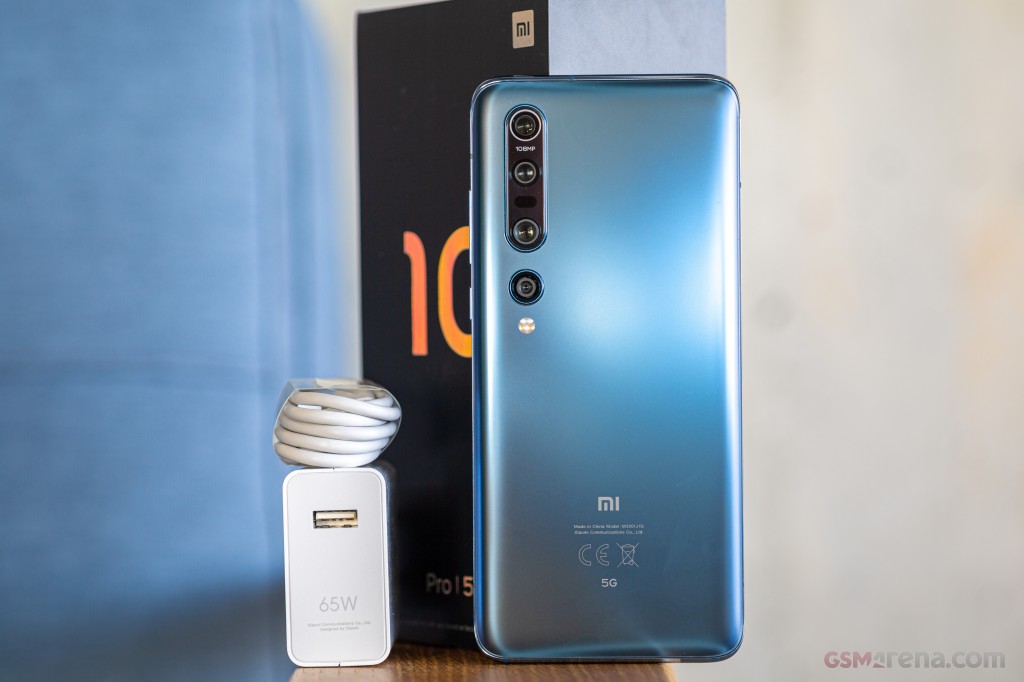
Also, I really wanted to try the 108 Megapixel camera. Alright, after that long reason. Starting with the exterior of the box, At the top, there is Mi 10 branding, and obviously a mention about the 108MP camera, and the snapdragon 865 and 5G capability. At the back, you get a few more features, and then the colour and storage variant. I went with the Twilight Grey colour, and the base variant of 8GB RAM and 128GB of Storage. Now let me quickly cut open the seal, and let us get in the box. As we lift the lid, this white envelope greets us. It contains the SIM tray ejection pin, USBC to 3.5mm audio jack adaptor, Users Guide, and a transparent, hardback TPU case. Next, we have the phone itself. Xiaomi should find a way to make it a bit easier to get the phone out of the box, maybe next time. For now, here is the Mi 10 in the TwillightGrey colour. while we take a look at other things in the box.

Xiaomi Mi 10 Pro 5G

Which are a USB type A to Type C cable for charging and data transfer, and a 33-watt fast-charging brick? After removing the plastic and stickers at the back, I like how this colour looks. And here’s that 108-megapixel camera, in this very densely populated camera module. Then there is Mi and 5G branding at the bottom of this very reflective back. Taking a quick look around this Mi 10, at the bottom, there is a speaker grill, a microphone, USB type C port for charging and data transfer, and finally a SIM tray. This SIM tray can hold 2 nano-SIM cards. It is not even a hybrid slot, so there is no way to expand the storage on this phone later on. On the right side, there are the Power and volume up and down buttons. As thin as these buttons are, they are very rigid. At the top, there is a secondary noise-cancelling microphone, an IR blaster, and a second speaker grill for stereo sound. And on the left side, there is nothing but the antenna band. At the front, there are this massive 6.67 inches super AMOLED display, with a resolution of 2340x1080 pixels.

This display supports a 90Hz refresh rate, and HDR 10+. There is a dot notch on the top left for the 20-megapixel selfie camera. It gets an in-display fingerprint sensor. While it is not the fastest one I have used, It is pretty accurate. Coming back to the camera, primary one gets a mammoth 108-megapixel sensor with a wide F/1.7 aperture and OIS. This camera is one of the reasons I decided to get this phone. It can shoot videos in 8K resolution. Let that sink in for a bit. This is the only phone coming in at Rs.50K which gets this feature. Samsung Galaxy S20 is the other phone that can do this, and it costs Rs.20K more than the Mi 10. Next camera, gets a 13-megapixel sensor withF/2.4 aperture and 12mm ultra-wide lens. Then there is a couple of 2 megapixels camera with F/2.4 aperture. One of these gets a macro lens and the other one is just a depth sensor. I am looking forward to and actually very excited to test these cameras out.

It packs in the Snapdragon 865 Processor with Adreno 650 GPU. You get to choose between the 8GB LPDDR5 RAMand 128GB or 256GB UFS3.0 storage. You don’t get to expand the storage down the line, so keep that in mind while deciding on the storage variant. There is a 4780mAh battery to power this Mi10, and when its time to juice it up, it supports 30watt wired and wireless charging. It is also capable of delivering 10watt reverse wireless charging. It is running on the latest version of MIUI11 built on top of Android 10. If you know  about Xiaomi or Redmi phones, you know that I am not the biggest fan of MIUI. But I am again willing to give it a try for the next few weeks. I’ve had this phone for less than a day, so I can’t really say much about its overall performance or battery life. I’ll have more to say about this in my full review. What I can tell you now, is this phone looks and feels amazing in the hands.

It is a bit taller, but it’s not as wide as some other large phones, so it is much easier to hold on to. That is it for now, If you are looking to buy the Mi 10, I will leave a link to it in the description section, and you can get it from Amazon. That is it, guys. Please hit the like button if you enjoyed this blog and follow to the blog for more quality tech blog like this. I’ll catch you guys in the next blog. Take care.

Android 11 in phones!

  The beta for the next version of Android, which is Android 11 , is available for Pixel phones .  I wanna get into what the new features ar...